Memory Installation Guide for Cisco®

Cisco® 7200 VXR Series Routers

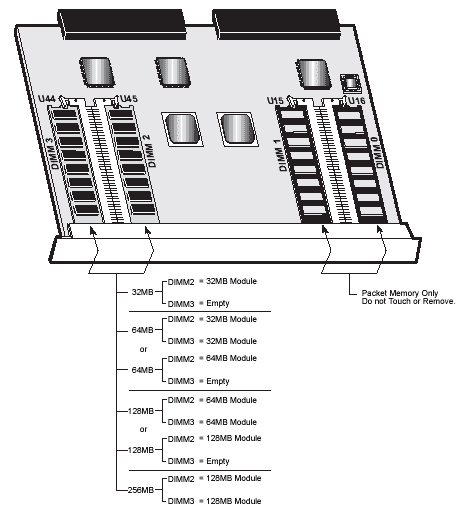
The illustration below shows the memory module installation sequence for Cisco® 7200 VXR series routers. As indicated in the illustration, there are four memory expansion sockets: DIMM0, DIMM1, DIMM2, and DIMM3. Kingston's KCS-D72VXR/32, /64, and /128 modules are designed for use ONLY in the DIMM2 and DIMM3 sockets. Make sure you carefully follow the memory installation sequence shown below; attempting to use other combinations will result in a non-functional router.

Note: These instructions should be used in conjunction with your own Cisco® 7200VXR documentation.

Cisco® 7200 VXR Series Routers


Cisco Memory Upgrade

Write to support@ciscomemoryupgrade.com if you need help on Cisco Memory Upgrade or if you have any comments or suggestions

Copyright 2003

Cisco Memory Upgrade
www.ciscomemoryupgrade.com

Web Site Design by 2edge.com