|
1. Place your
router's power switch in the off position.
2. The single
PC Card flash storage slot is located on the router's front panel.
3. Handle your
new PC Card carefully; do not flex or bend the card. Always grasp
the card by its edges.
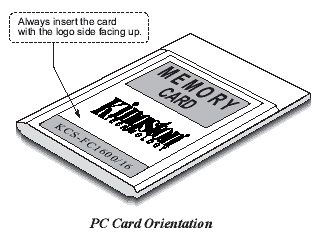
4. Always insert
the PC Cars into the expansion slot with the Kingston logo facing
up as shown in the illustration.
5. Continue
sliding the card into the slot until it seats into the router's
PC card connector. When the card is properly seated in the mating
connector, the card ejector button will pop out. If you need to
remove the card, simply press the ejector button.
6.Once the PC
Card has been installed, it can then be loaded with the approperiate
program information.
|